• New
    Sonoff CAM GlassView CAM-S3W Smart Wi-Fi 2K Dual Band Window Camera without Drilling
    Sonoff CAM GlassView CAM-S3W Smart Wi-Fi 2K Dual Band Window Camera without Drilling
    Sonoff CAM GlassView CAM-S3W Smart Wi-Fi 2K Dual Band Window Camera without Drilling
    Sonoff CAM GlassView CAM-S3W Smart Wi-Fi 2K Dual Band Window Camera without Drilling
    Sonoff CAM GlassView CAM-S3W Smart Wi-Fi 2K Dual Band Window Camera without Drilling
    Sonoff CAM GlassView CAM-S3W Smart Wi-Fi 2K Dual Band Window Camera without Drilling
    Sonoff CAM GlassView CAM-S3W Smart Wi-Fi 2K Dual Band Window Camera without Drilling
    Sonoff CAM GlassView CAM-S3W Smart Wi-Fi 2K Dual Band Window Camera without Drilling
    Sonoff CAM GlassView CAM-S3W Smart Wi-Fi 2K Dual Band Window Camera without Drilling
    Sonoff CAM GlassView CAM-S3W Smart Wi-Fi 2K Dual Band Window Camera without Drilling
    Sonoff CAM GlassView CAM-S3W Smart Wi-Fi 2K Dual Band Window Camera without Drilling
    Sonoff CAM GlassView CAM-S3W Smart Wi-Fi 2K Dual Band Window Camera without Drilling
    Sonoff CAM GlassView CAM-S3W Smart Wi-Fi 2K Dual Band Window Camera without Drilling
    Sonoff CAM GlassView CAM-S3W Smart Wi-Fi 2K Dual Band Window Camera without Drilling

    Sonoff CAM GlassView CAM-S3W Smart Wi-Fi 2K Dual Band Window Camera without Drilling

    €39.89
    Tax included
    rating No review at the moment
    • Window camera: attaches to the inside of the glass and records outside: no rain, no tampering, no holes in the wall, and your home Wi-Fi just a few metres away.
    • No reflections on the glass: it has no infrared LEDs, which would reflect off the glass at night, and an anti-reflection algorithm reduces sunlight glare.
    • 2K colour video: 3 MP sensor, 2K resolution (2304 × 1296), F1.0 lens and a 100° field of view.
    • Night vision with ambient light: footage stays in colour at night with streetlights, lanterns or moonlight; without infrared, image quality deteriorates in completely dark areas.
    • AI person detection: detects people and motion and sends real-time alerts through the eWeLink app; supports two-way audio.
    • Subscription-free recording: records to a microSD card up to 128 GB, not included, either continuously 24/7 or when events occur. Cloud storage is not supported.
    • OpenEdge local web console: view the live feed, configure the network, AI detection, image and audio settings, and update the firmware from your browser, without an app or account; recording playback is not supported.
    • RTSP, ONVIF and Open API: RTSP and ONVIF can be enabled locally for Home Assistant, NAS devices and video surveillance software; JSON-RPC 2.0 API over HTTP and WebSocket.
    • Works with Sonoff sensors: in the eWeLink app, the status of a Sonoff Zigbee sensor becomes a camera event; Zigbee sensors require a Sonoff hub.
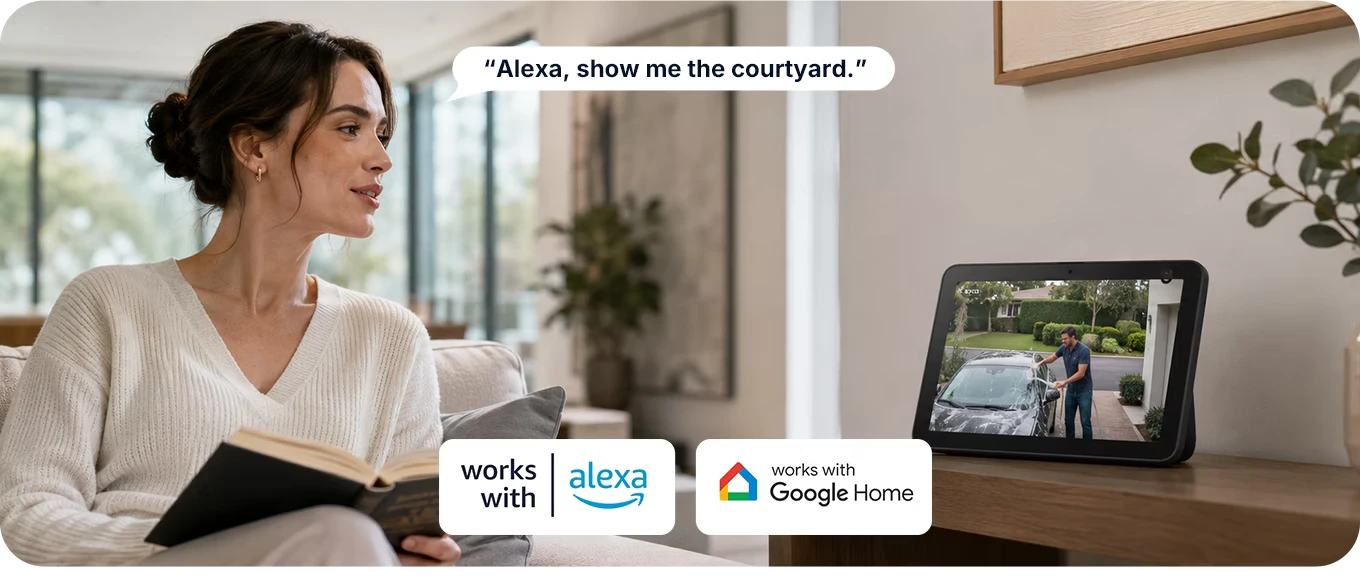
    • Alexa and Google Home: live viewing and two-way audio are available only on smart displays: Echo Show 5, 8, 10, 11 and 15, Google Nest Hub, Nest Hub 2nd gen. and Nest Hub Max.
    • Dual-band Wi-Fi: connects to 802.11 a/b/g/n Wi-Fi at 2.4 GHz or 5 GHz: select the network during pairing with the eWeLink app.
    • Three magnetic brackets: small, large or 18° angled bracket, orientable in four directions, with 3M adhesive; the camera attaches magnetically and can be detached without removing the bracket.
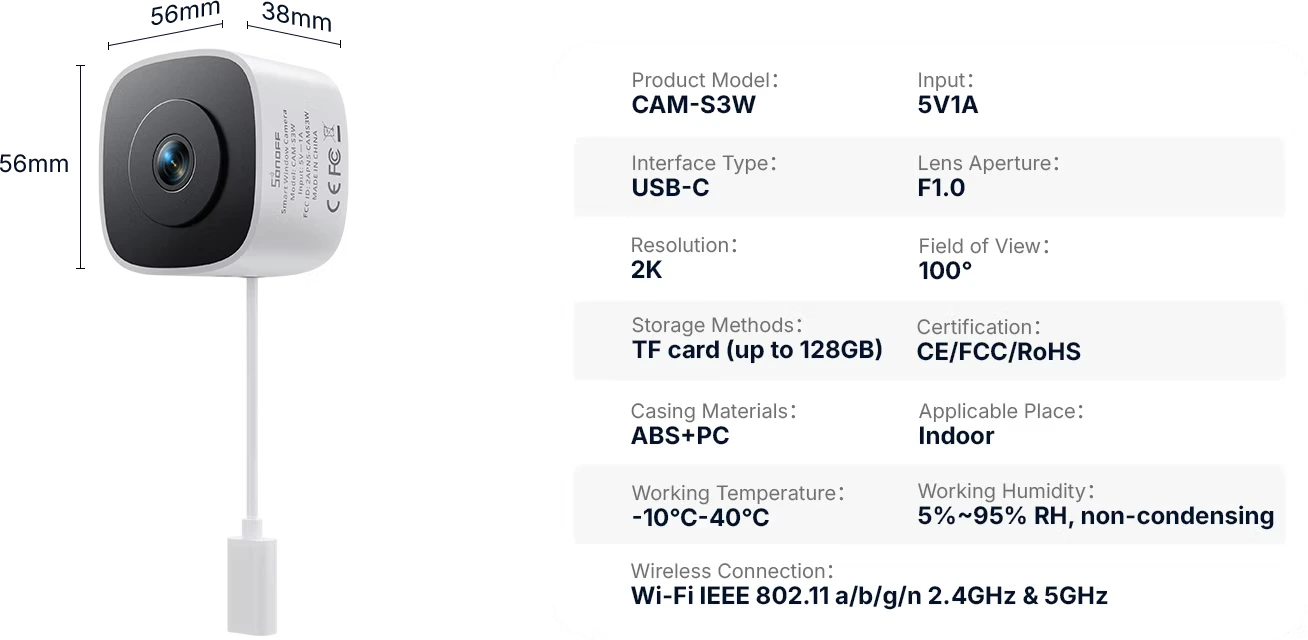
    • Compact, for indoor use only: measures 56 × 56 × 38 mm and weighs 61.9 g, with a white ABS+PC housing; operates between -10 and 40 °C and is powered via USB-C at 5 V 1 A.
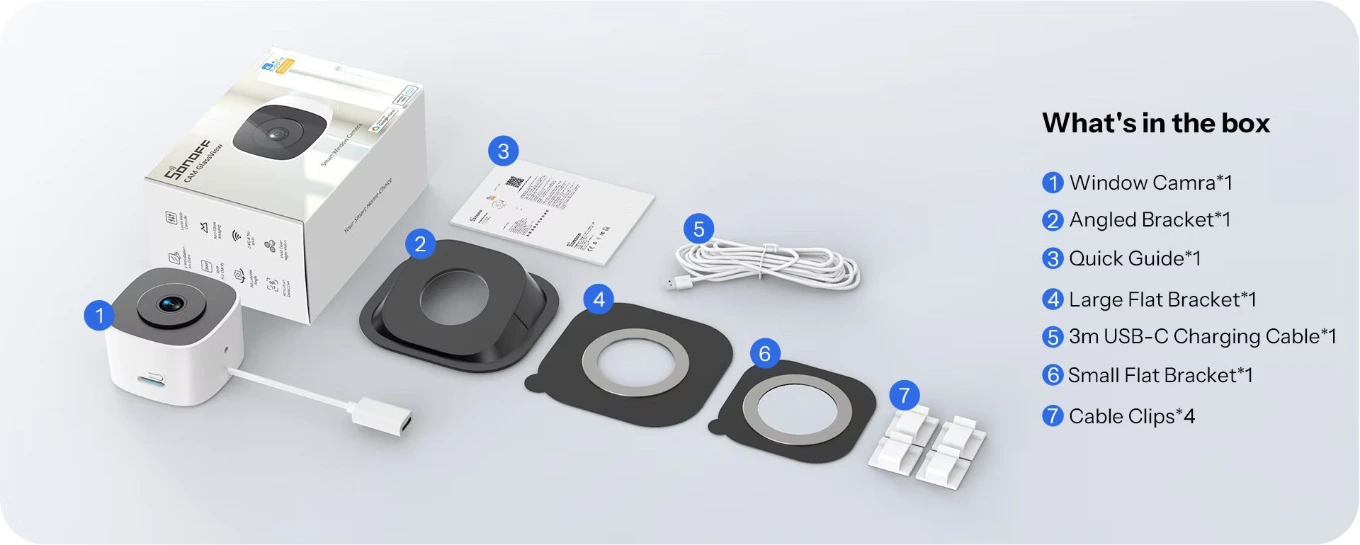
    • In the box: camera, three brackets, 3 m USB-C cable, 4 cable clips and quick start guide. 5 V 1 A USB power adapter and microSD card not included.
    Quantity :
    Not sure it works with your home?
    Close
    • Secure payments: Secure payments: cards, PayPal, bank transfer, and installments
    • Delivery within 48 hours: Delivery within 48 hours: Free shipping on orders over €150 across Europe
    • Easy 14-day returns: Easy 14-day returns: follow the steps to get your refund

    Buy it with

    • Sonoff CAM GlassView CAM-S3W Smart Wi-Fi 2K Dual Band Window Camera without Drilling
    • +
    • Sonoff Cam Slim 2nd Generation
    • +
    • Sonoff Cam Slim FHD
    • €87.48-3 %
      Total price: €84.86

    Sonoff CAM-S3W GlassView: 2K window camera that captures outside without reflections or holes

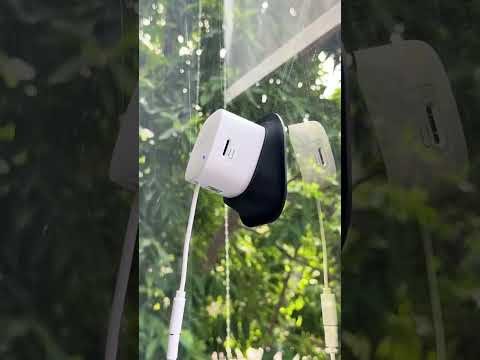
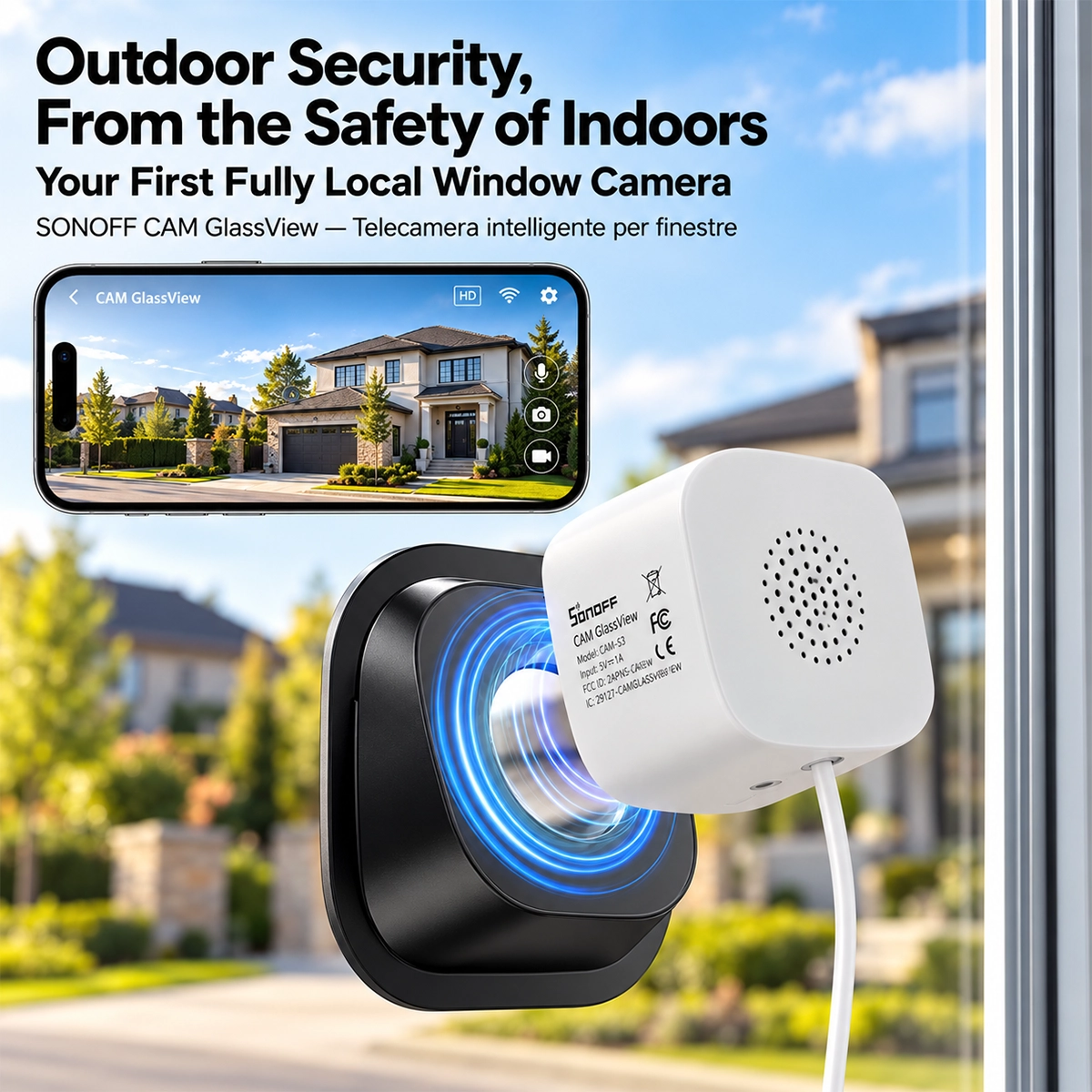
    Sonoff CAM-S3W GlassView attached to a window glass with the black bracket, facing the house and garden

    The Sonoff CAM-S3W GlassView is a Wi-Fi camera designed to be placed indoors, attached to a window pane, and capture what's happening outside. This protects it from rain and tampering, requires no drilling in the wall, and has your home Wi-Fi just a few meters away. It records in 2K with a 3 MP sensor, F1.0 lens, and 100° field of view, and has no infrared LEDs: at night, the image remains in color with the light of streetlights and lanterns, without reflections on the glass. It detects people with AI, records to a microSD card up to 128 GB without a subscription, can be configured via the eWeLink app or local web console , and integrates with Home Assistant via RTSP and ONVIF .

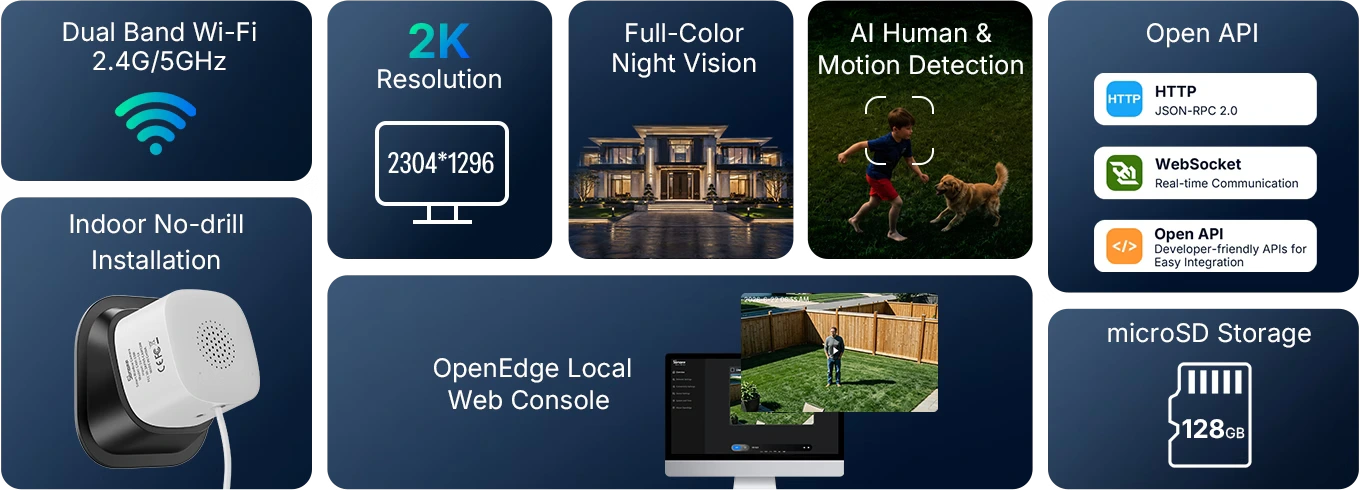
    Sonoff CAM-S3W features in eight sections: dual-band Wi-Fi, 2K, color night vision, microSD, web console and Open API

    Why a window camera: the limitations of outdoor and indoor cameras

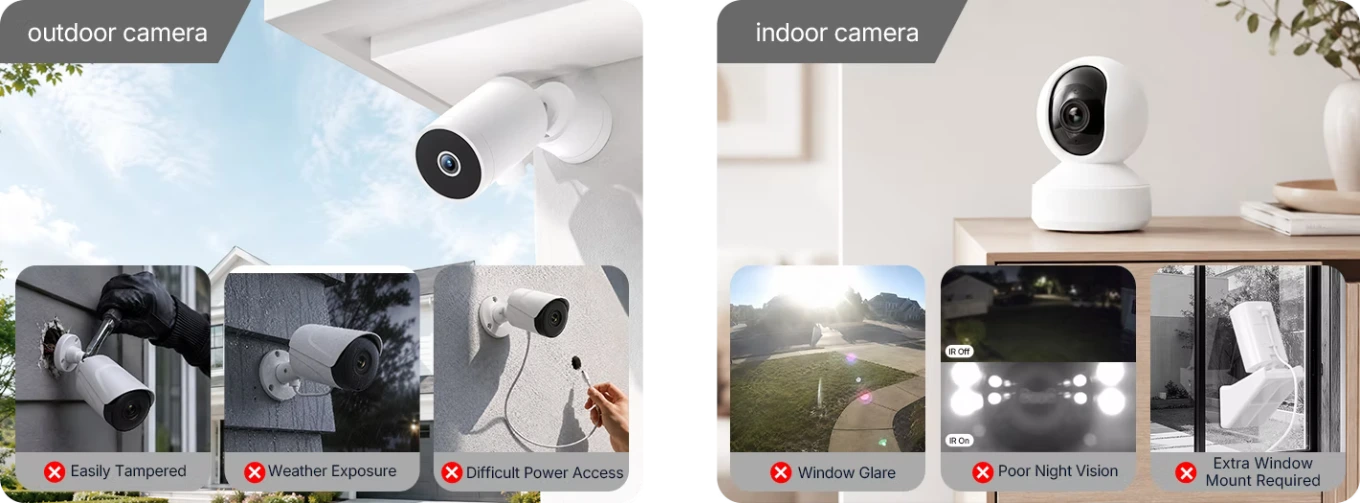
    An outdoor camera must be mounted on the wall, running power to the mounting point. It remains exposed to rain and sun, and anyone can reach it and remove it. An indoor camera placed behind a window has the opposite problem: the glass reflects the sun during the day and, at night, the light from its infrared LEDs , which bounces off the glass and covers the scene. The CAM-S3W was created for this situation: it attaches directly to the glass, from the inside, with an adhesive bracket, and its lens is designed to shoot through the window. If you need a camera to mount outside, you can find the Sonoff CAM-B1P outdoor camera and other Wi-Fi cameras in the catalog.

    Outdoor camera exposed to tampering and weather, indoor camera with reflections on glass and poor night vision

    Clear image through glass: no infrared and anti-reflection algorithm

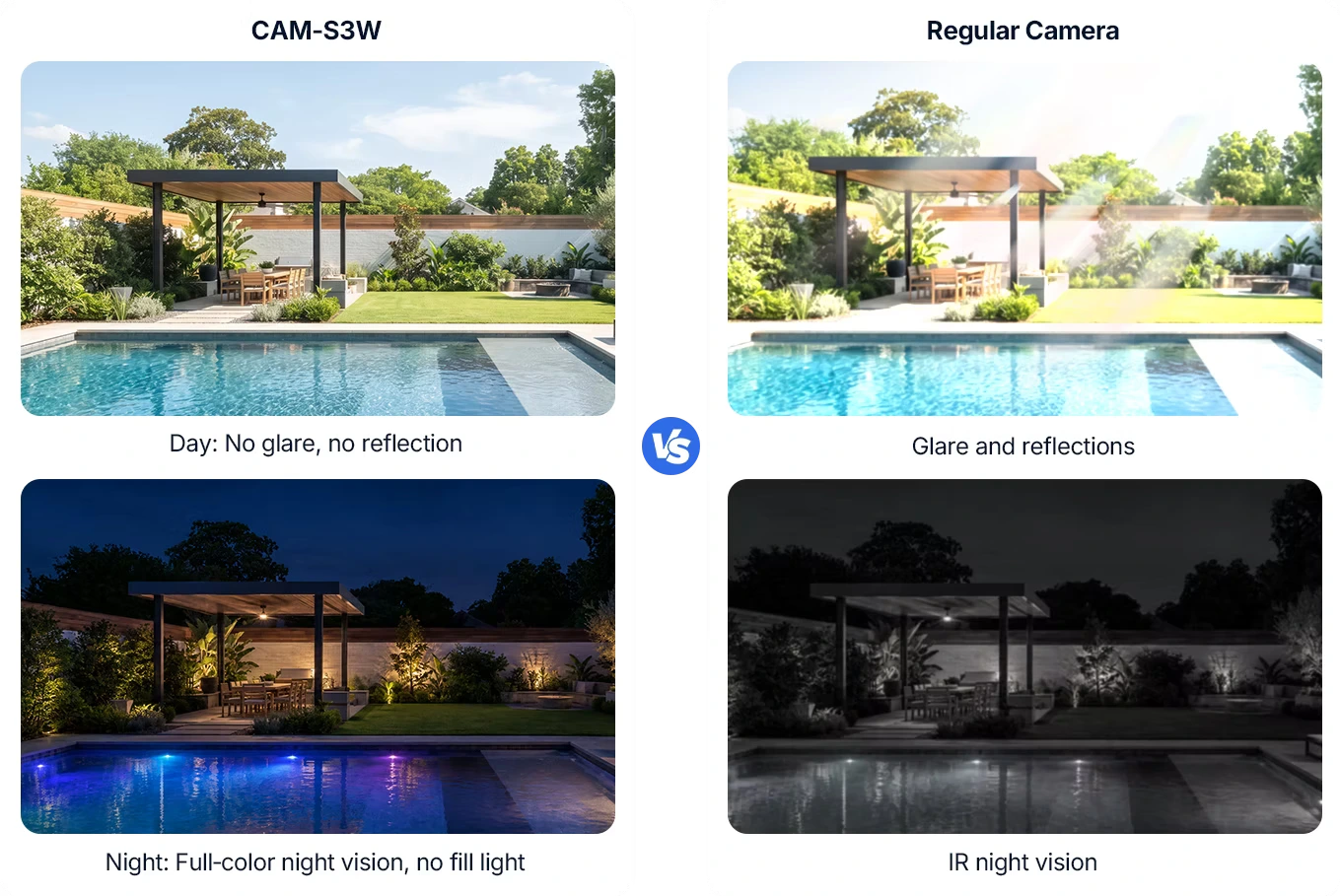
    The comparison shows the same scene captured by the CAM-S3W and a standard camera behind glass. During the day, the anti-glare algorithm reduces glare and reflections, so the garden and pool remain visible. At night, the difference is more marked: the CAM-S3W has no infrared illuminators or white lights and uses the available light, such as street lamps, garden lights, or the moon, maintaining the color image, while the standard camera switches to black and white with the infrared reflecting off the glass. The downside is important to note: in a completely dark area, with no external light, the CAM-S3W's image deteriorates.

    Comparison through the glass: The CAM-S3W captures the pool without reflections during the day and in color at night, the common one does not.

    Magnetic bracket tilts 18° in four directions

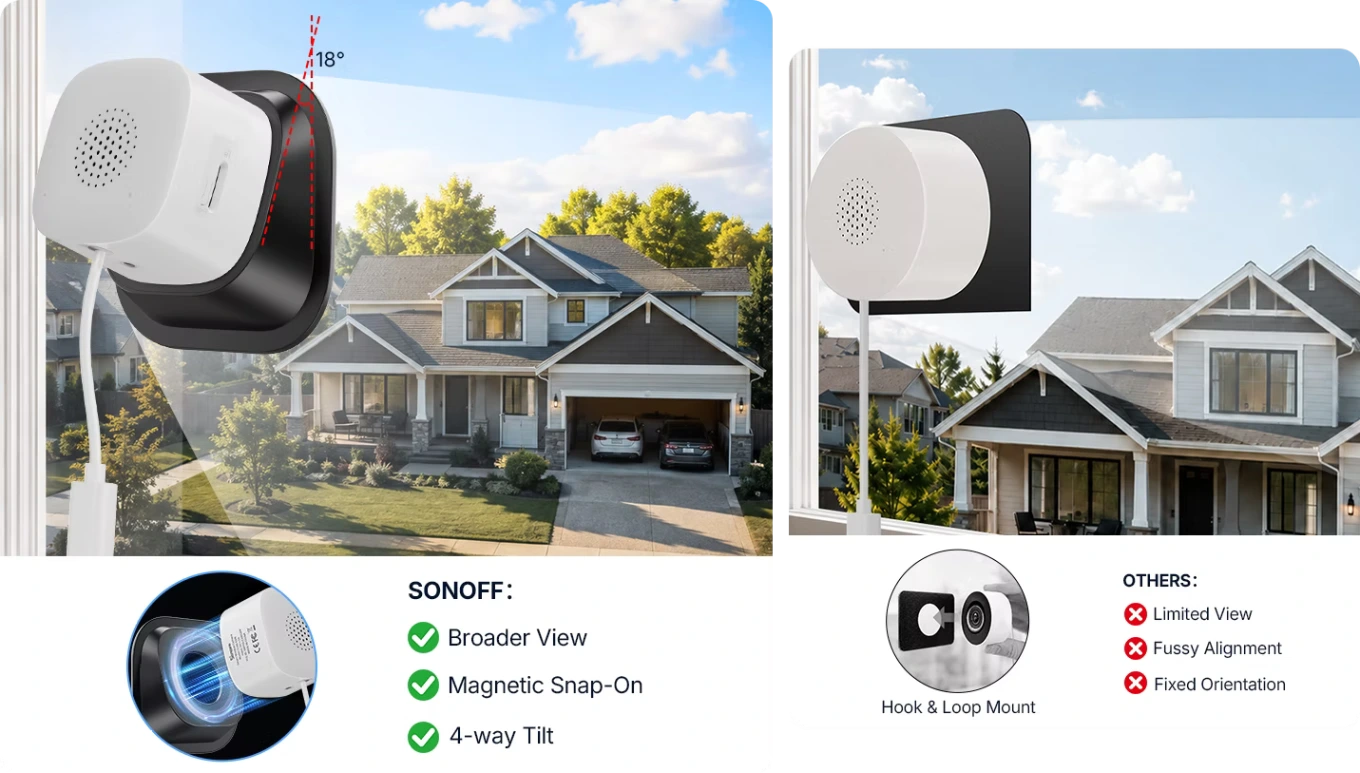
    The camera isn't glued to the glass; the bracket is. A magnet in the camera body attaches to the metal part of the bracket, so you can detach it to move it, insert a microSD card, or clean the glass, and then put it back in place without removing the adhesive. With the bracket tilted , the camera can look up, down, or sideways at an 18° angle, useful on higher floors for viewing the driveway or a side door. The hook-and-loop mounts used by other window cameras, however, provide a narrower view, less precise alignment, and a fixed orientation.

    CAM-S3W magnetic bracket tilts in four directions, preventing hook-and-loop fastening with limited view

    Three 3M adhesive brackets: small, large and angled

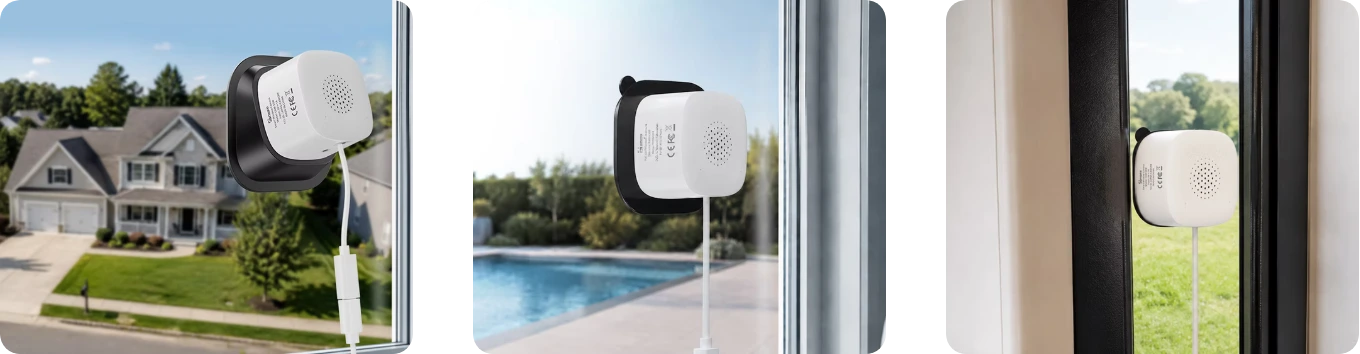
    The package includes three brackets , all with 3M adhesive. The small bracket is used where space is limited, such as on the narrow glass of a French window or next to the frame. The large bracket is the standard one, and Sonoff recommends it especially on double-glazed or thicker glass, where it holds the camera more firmly. The angled bracket is used when the window doesn't face directly toward the monitored area: from the first floor toward the gate, or sideways toward the parking space. Sonoff recommends installation at a maximum height of 2 meters .

    The three brackets of the CAM-S3W on the glass: inclined for high floors, straight for the swimming pool and compact for narrow spaces

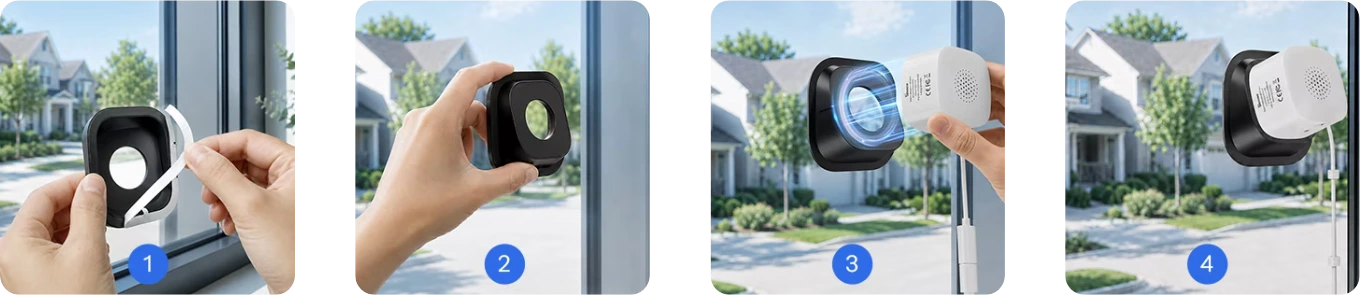
    Installation without drilling in four steps

    Installation takes just a few minutes and requires no tools. First, thoroughly clean the glass on both sides in the chosen area. Then, attach the camera to the bracket and check the live view in the eWeLink app or web console. Once the position is correct, remove the camera, peel off the protective film from the adhesive, and press the bracket onto the glass. Finally, reattach the camera with the magnet and secure the 3m USB-C cable with the four included cable clips. A shaded window is best: prolonged direct sunlight can weaken the adhesive over time. The 5V 1A USB power adapter is not included.

    Installing the CAM-S3W in four steps: peel off the film, stick the base to the glass and attach the camera

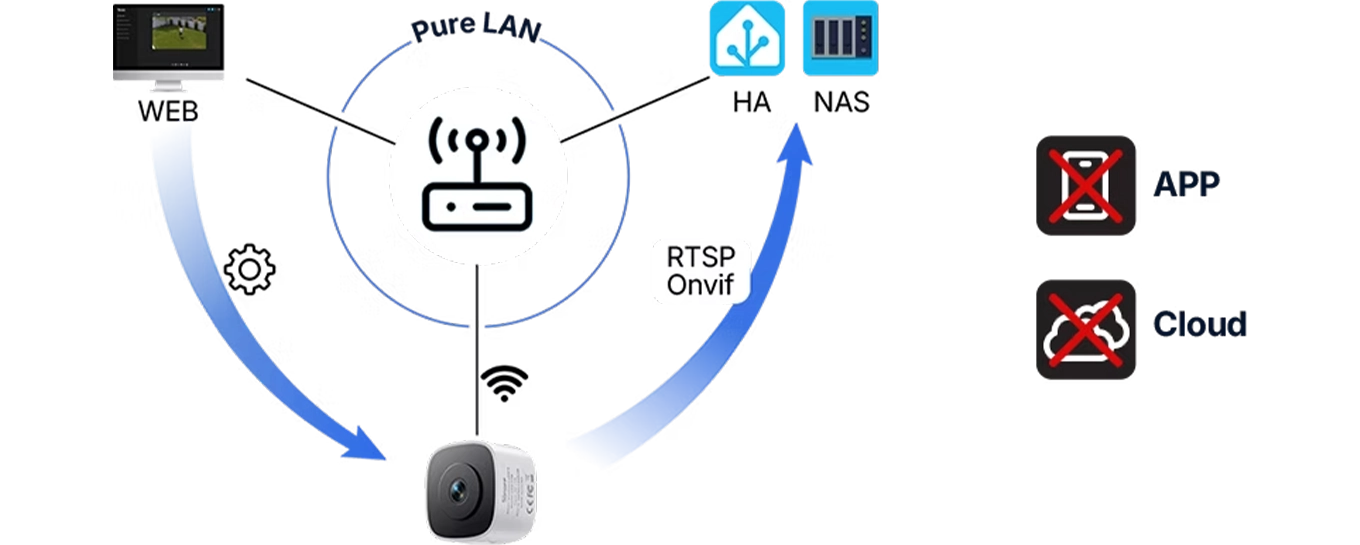
    Local network only: Web console, RTSP and ONVIF without apps and without cloud

    The CAM-S3W can work entirely on a local network . You can configure it from a browser on a computer connected to the same network, integrate it with Home Assistant or a NAS via RTSP and ONVIF , and save recordings to a microSD card: in this configuration, neither the app nor a cloud account is required, and the images stay at home. The eWeLink app is used for initial pairing and to receive notifications on your phone, if you want them. Cloud storage for recordings is not supported: there is no subscription to pay, and likewise, there is no online archive of clips.

    OpenEdge Local Web Console Schematic: CAM-S3W in LAN with browser, Home Assistant, NAS and RTSP/ONVIF without apps or cloud

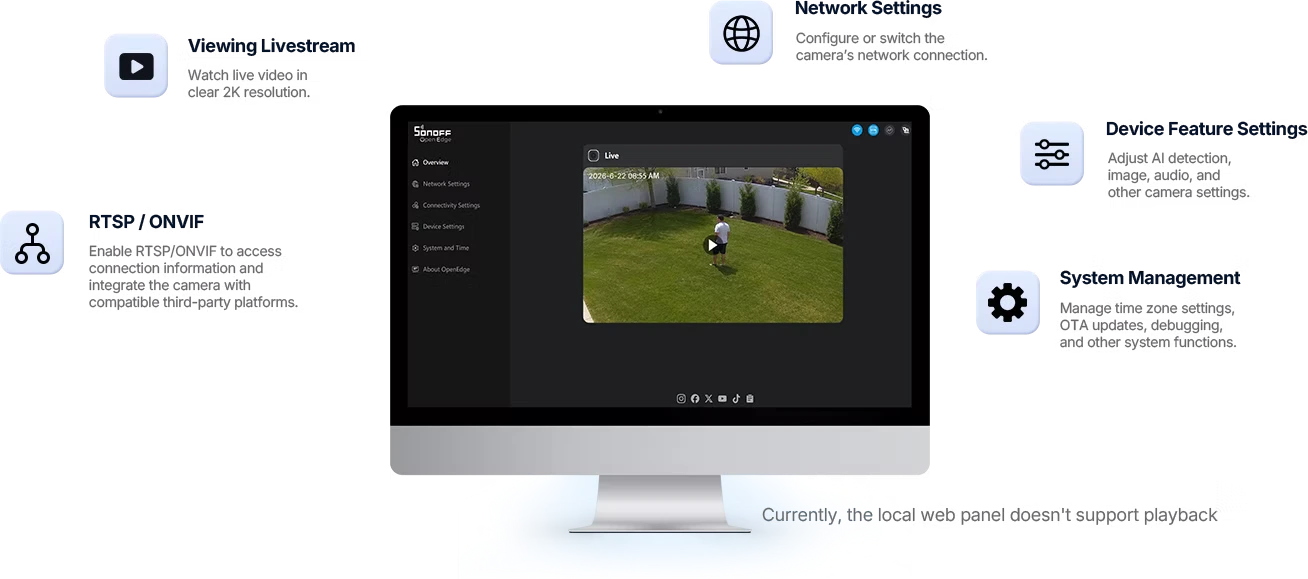
    OpenEdge Web Console: Live 2K, Networking, AI Detection, and Updates

    The OpenEdge web console opens from a browser with the camera's IP address and the password you set. From here, you can watch live video in 2K , configure or change your Wi-Fi network, and adjust the camera's features: AI detection , image, and audio. In the system section, you can set the time zone and update the firmware over- the-air , while the RTSP/ONVIF section enables video streaming and displays the login information for external platforms. Please note: the web console currently does not play microSD recordings ; these can be viewed using the app or connected software via RTSP.

    CAM-S3W OpenEdge web console on monitor: 2K live, network, AI detection, RTSP/ONVIF, time zone and OTA updates

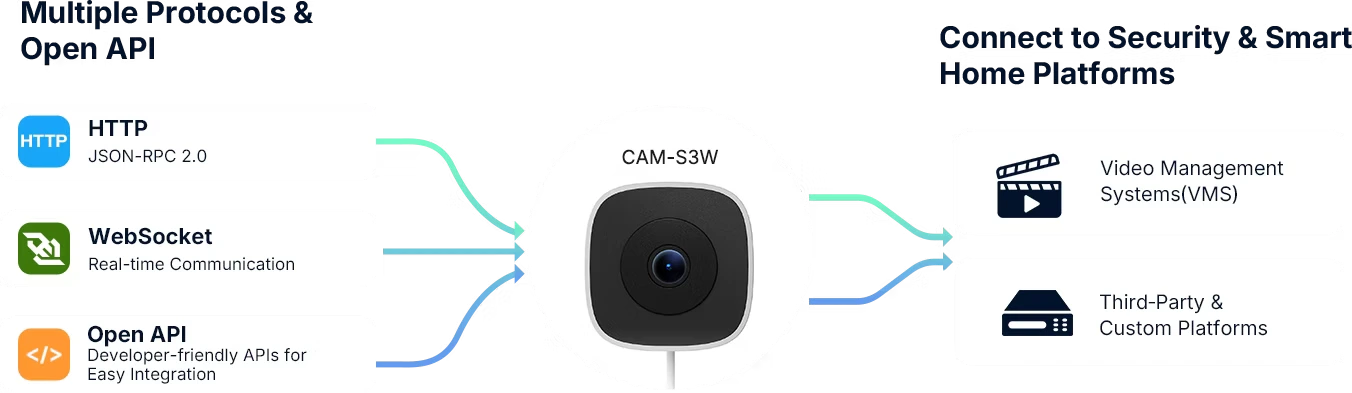
    Open API JSON-RPC 2.0 over HTTP and WebSocket for video surveillance software

    Those integrating video surveillance systems also have an open API : the camera accepts JSON-RPC 2.0 commands via HTTP and real-time communication via WebSocket . This allows it to integrate with video management software (VMS) or a custom-developed platform, not just home apps. Sonoff publishes the API documentation in its support center. For home use, it's not necessary: to view and record in Home Assistant, a NAS, or software such as video surveillance, simply enable RTSP or ONVIF from the web console.

    The CAM-S3W communicates via HTTP JSON-RPC 2.0, WebSocket and Open API with VMS video surveillance systems and third-party platforms.

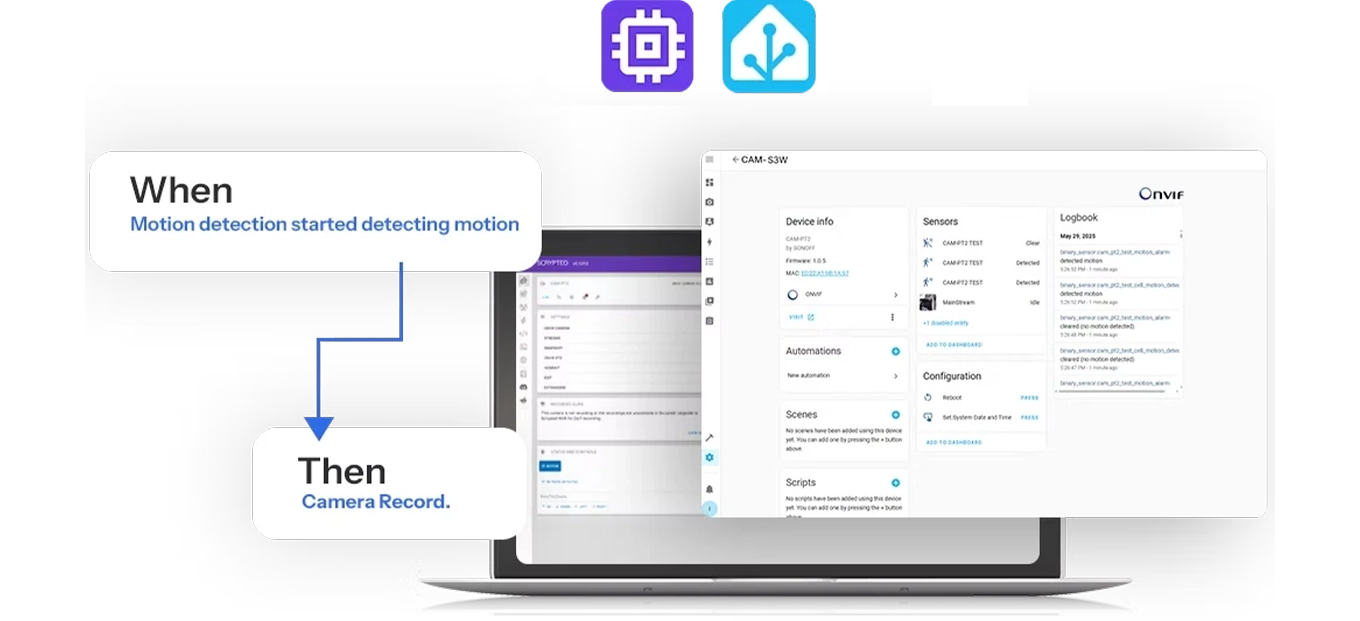
    Home Assistant via ONVIF: Camera movement triggers automations

    The CAM-S3W connects to Home Assistant via ONVIF or RTSP, without going through the cloud. With ONVIF, Home Assistant also receives the camera's motion sensor, which you can use as a trigger in automations: for example, when the camera detects motion, it starts recording or turns on the garden lights. The same RTSP stream can be sent to a NAS or a software video recorder that supports RTSP cameras. Sonoff publishes the guide to integrating with Home Assistant in its help center. If you also want to control doors and passages, add Sonoff Zigbee sensors with a hub like the ZBBridge Ultra or Bridge Max .

    Automation in the CAM-S3W console: when it detects motion it starts recording, with Home Assistant integration

    Where to install it: offices, villas, campers, condominiums and shop windows

    All it takes is a window or glass door facing the area to be monitored. In an office, it records the entrance through the glass door; in a house , the front or back garden; in a camper , the area around the vehicle while parked. In an apartment, it monitors the courtyard or entrance to the building from the window; in a shop , the window and entrance; and in a townhouse, the driveway and parking space. It works best on single-glazed windows; slight reflections may appear on double-glazed windows; however, tinted, low-emissivity, or patterned glass are not recommended.

    Six locations for the CAM-S3W behind glass: meeting room, cottage, camper, apartment building, shop, and townhouses

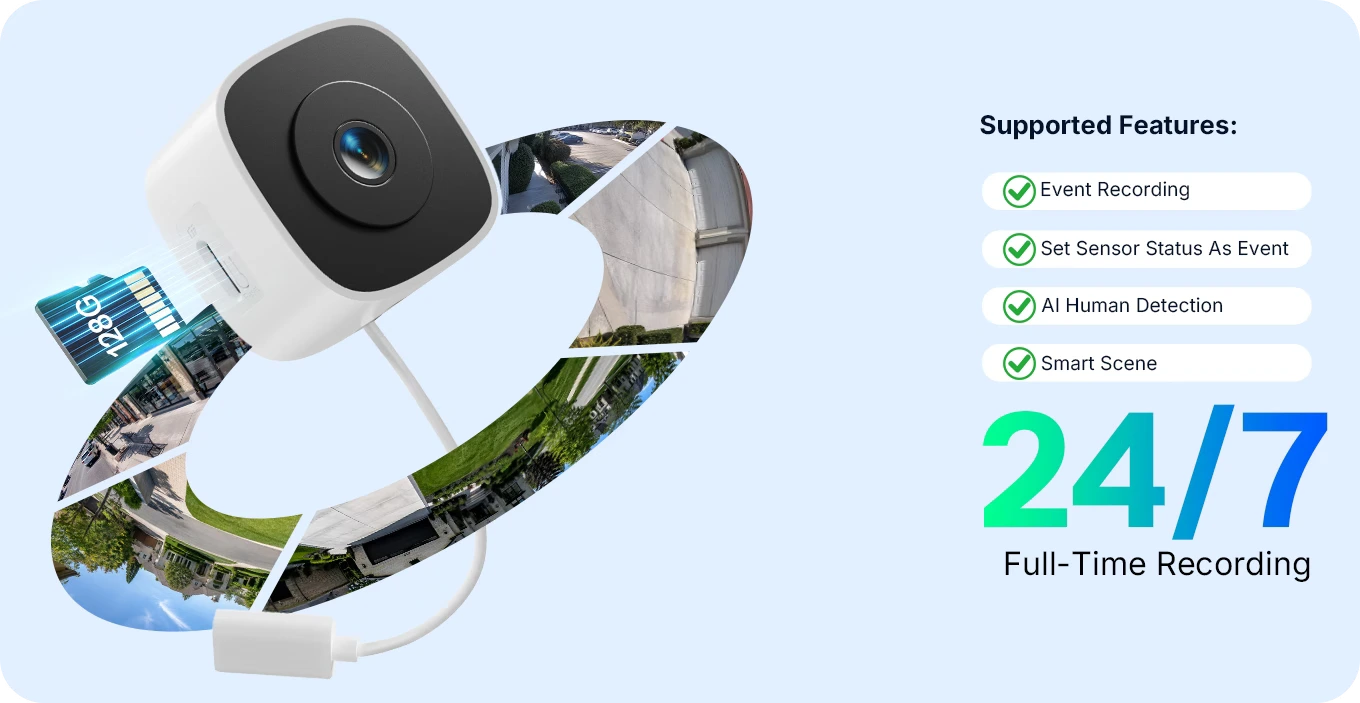
    Local recording on microSD up to 128 GB, without subscription

    All recordings remain locally, on the microSD card up to 128 GB inserted in the camera and sold separately, such as the BanQ High Endurance 128 GB card . You can record continuously 24/7 or only when events occur, and there's no subscription fee. Supported features include event recording, AI person detection , smart scenes, and the ability to use a sensor's status as an event: a Sonoff sensor triggering, such as an open door, becomes an event for the camera. Without the card, events still appear in the app list, but without images or clips to review.

    Sonoff CAM-S3W with microSD for local storage: 24/7 or event recording, people detection and smart scenes

    AI-powered people detection and real-time alerts

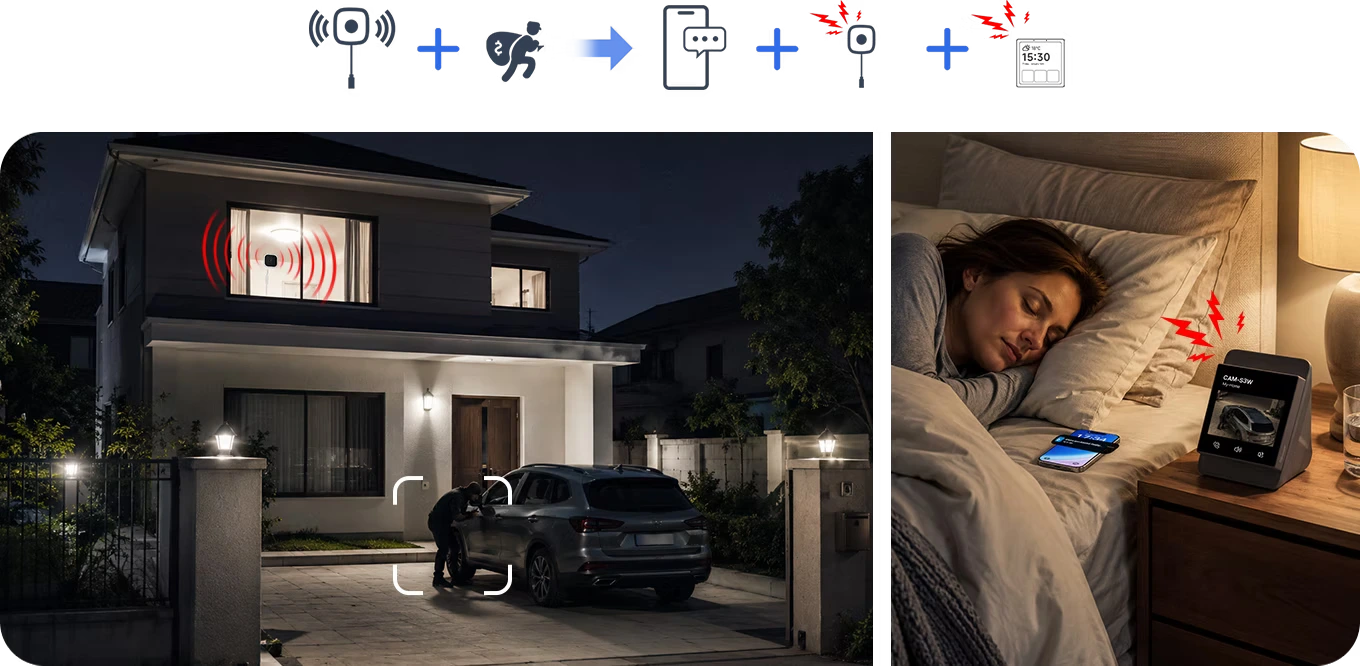
    AI person detection distinguishes between people and unimportant movement and sends a real-time alert to your phone. In the Sonoff example, someone approaches the car in the driveway at night: the camera detects it, a notification arrives, and the camera emits an audible alarm, while in the bedroom the smart display shows the scene. The CAM-S3W also supports two-way audio . To also control doors and windows, you can add Sonoff Zigbee sensors, such as the SNZB-04PR2 door and window sensor , which requires a Sonoff Zigbee hub.

    CAM-S3W Security Scene: Detects a person in the driveway at night and alerts your phone and devices at home

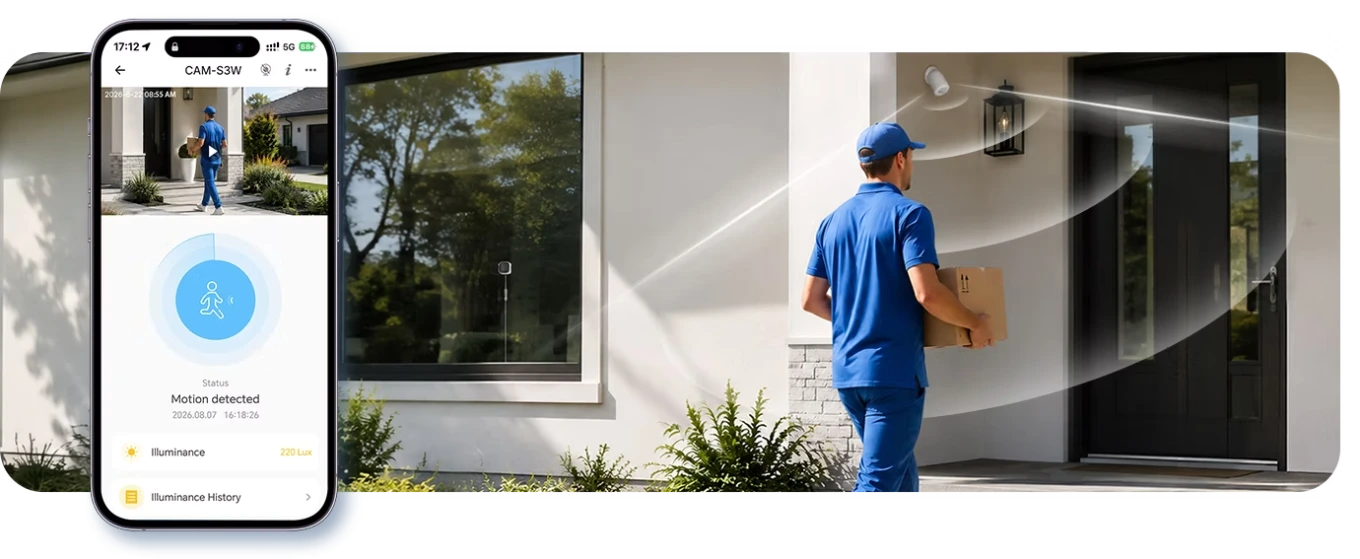
    Sonoff Sensors and Camera: Sensor Status Becomes an Event

    Motion detected notification in the app with brightness reading as a delivery person approaches your front door

    Live on Echo Show and Nest Hub with Alexa and Google Home

    With Alexa and Google Home, the camera can be viewed on smart displays with a screen. Live video and two-way audio work on Amazon Echo Show 5, 8, 10, 11, and 15 , as well as on Google Nest Hub , second-generation Nest Hub, and Nest Hub Max: just say, for example, "Alexa, show me the backyard." There's no video on speakers without a screen. Sonoff doesn't support Apple Home and Matter for this camera.

    Voice command to Alexa to see the yard on the Echo Show screen: CAM-S3W compatible with Alexa and Google Home

    Technical specifications and package contents

    Sonoff CAM-S3W Specifications: 56 × 56 × 38 mm, 5 V 1 A USB-C, 2K, F1.0, 100°, microSD up to 128 GB, Wi-Fi 2.4 and 5 GHz
    CAM-S3W Package Contents: Camera, tilt bracket, two flat brackets, 3m USB-C cable, guide and 4 cable clips

    Frequently Asked Questions

    Does it work through any glass?

    It performs best on single-glazed glass. Slight reflections may appear on double-glazed glass; tinted or low-emissivity (Low-E) glass degrades the image, especially at night. Decorated or frosted glass and mosquito netting in front of the lens are not recommended.
    Yes, in color, but with the available light: streetlights, spotlights, or the moon. It has no infrared or its own light, so as not to reflect on the glass. In a completely dark area, the image deteriorates.
    For initial pairing, use the eWeLink app. Afterward, you can view live video, change settings, and update firmware from the local web console without an app or account. The web console does not play recordings.
    No. It records continuously or on events to a microSD card up to 128 GB (not included). Cloud storage is not supported. Without a card, events appear in the app, but without images or clips.
    Yes, via RTSP or ONVIF, which you enable locally from the web console. With ONVIF, Home Assistant also receives motion detection for use in automations.
    Yes, for live viewing and two-way audio on smart displays: Echo Show 5, 8, 10, 11, and 15, Google Nest Hub, 2nd gen Nest Hub, and Nest Hub Max.
    Sonoff does not claim Apple Home or Matter compatibility for this camera.
    No. It's an indoor camera, mounted behind glass, and operates between -10 and 40°C with humidity between 5 and 95% non-condensing. For outdoor use, you'll need an outdoor camera.
    A 2.4GHz or 5GHz 802.11 a/b/g/n Wi-Fi network: you choose it when pairing with the eWeLink app.
    Direct, prolonged sunlight can weaken the adhesive over time: choose a shaded window if possible and clean the glass thoroughly before attaching the bracket.
    The camera, tilt mount, large and small flat mounts, a 3-meter USB-C cable, four cable clips, and a quick-start guide are included. The 5V 1A USB power adapter and microSD card are not included.
    Sonoff Tech
    Sonoff-CAM-S3W

    Data sheet

    Power supply
    DC 5V 1A
    Colors
    White
    Material
    ABS+PC
    Working temperature
    –10~40°C
    Working humidity
    5% - 95% non-condensing
    Voice Control
    Amazon Alexa and Google Home

    Mobile application
    eWeLink
    Dimensions
    56x56x38 mm
    Item weight
    61.9 g
    Pixel Camera
    3.0 MegaPixel
    Microphone
    Incorporated
    Communication Protocol
    Wifi
    Support SD Card
    It supports up to 128G
    Angle of View
    100°
    Resolution
    2K
    Audio
    Bidirectional
    Wifi protocol
    Wi-Fi IEEE 802.11 a/b/g/n 2.4GHz/5GHz
    Connector
    Type-C
    Motion detection
    supported with automatic video recording feature
    Lens Aperture
    F1.0
    Power Supply
    USB 5V
    Usage environment
    Indoor
    Works with
    Amazon Alexa
    Google Home
    Home Assistant
    eWeLink (Sonoff)
    Hub required
    None (Wi-Fi / standalone)
    Ideal for
    Alarm & video surveillance
    Home Assistant integration
    RTSP / ONVIF camera

    Specific References

    UPC
    697903360079
    EAN13
    6979033600799
    MPN
    Sonoff CAM-S3W

    Download

    User Manual Sonoff CAM-S3W

    User Manual Expert4house Sonoff CAM-S3W Telecamera per Finestre Smart Wi-Fi

    Download (819.11KB)

    Click on a thumbnail to load the video

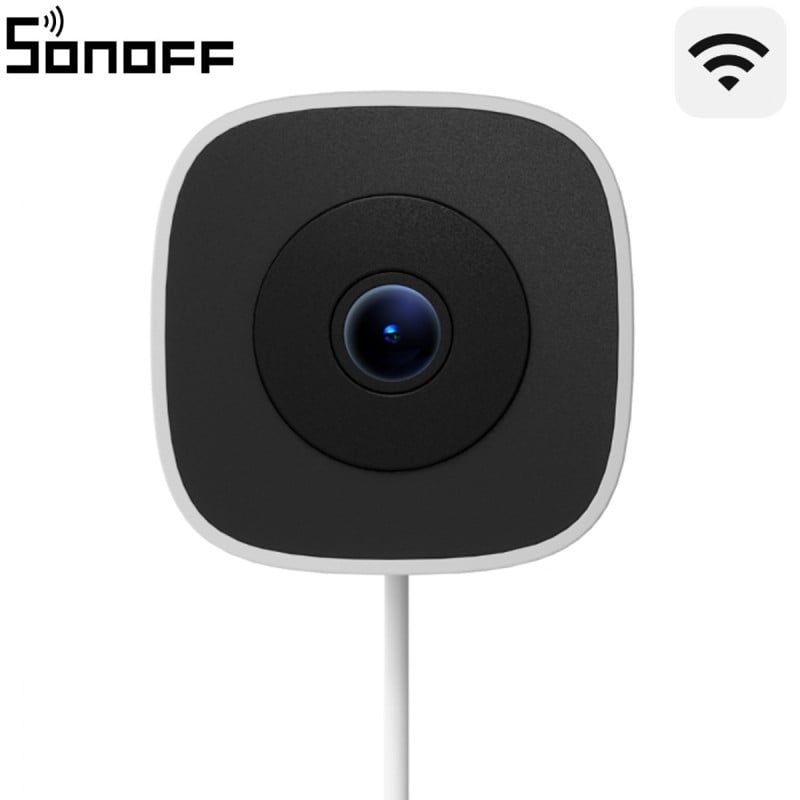
    Sonoff CAM-S3W GlassView front view: Wi-Fi camera with a black front panel, central lens and power cable
    Sonoff CAM GlassView CAM-S3W Smart Wi-Fi 2K Dual Band Window Camera without Drilling
    €39.89
    Tax included
    rating No review at the moment